
The February update for Xbox One comes with a load of social functions
Each month Xbox One gets a good batch of new features with its new update, this time gives users a lot of functions related to social activities to interact with their friends and other people in the world.
However, the console Microsoft is not alone be updated tomorrow because today the implementation of Xbox Mobile has also hosted a series of developments affecting the Avatars, and other improvements that we discuss in detail below.
February surprise for Xbox One
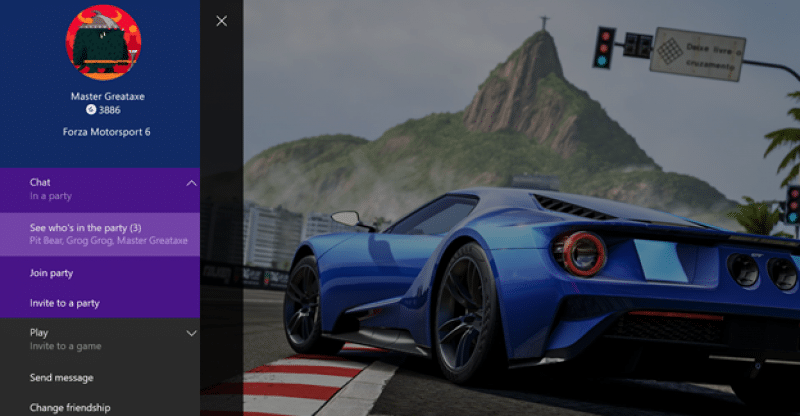
Users now can see who is in a group in a game before joining. To do so it will be pressed in the name of a friend who is in the group so you can check who are the other people and who are with him. This will be done by clicking on the “Chat” option and when will list the gamer tags of each.
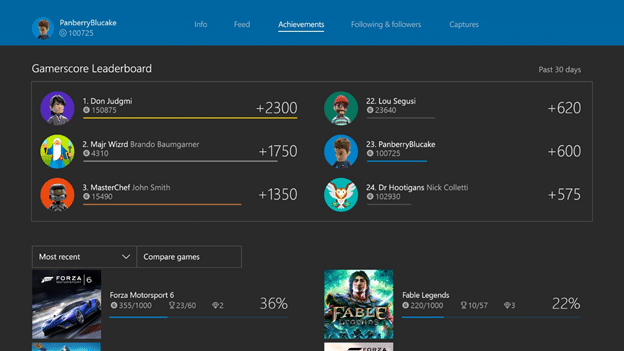
Be introduced leaderboards. To access it simply click on your own achievements and with them will come a list of your friends so you can compare your score with the rest. In addition, also it indicates the number of points achieved in the last 30 days and even more detail can consult achievements.
The filter activity has been updated so that it will warn us whenever there is new related products that have all interesting elements. Clicking on the link will automatically appear to us and we will list new tickets and view all the news now in a more simple way.
It has become to add an option that allowed users to hide contents as betas, contests, games and other applications that do not wish to reinstall. At the same time they have also included another option for now which makes it easier to access the channels of our friends whenever they are broadcasting a game live from Twitch.
In the friends list now appears an option that will suggest people you might know. Thus it will appear the nick your gamer tag, your real name in case you provide, your profile picture, your avatar and a reason to explain why they suggest that particular person.
Now you can have hotkeys on the chatpad to your favorite applications each. The joystick interface may configure the X1 and X2 buttons to take us directly to the programs we choose and thus do not need to have to navigate the menu in your search.
Brand new for Xbox One and Xbox application
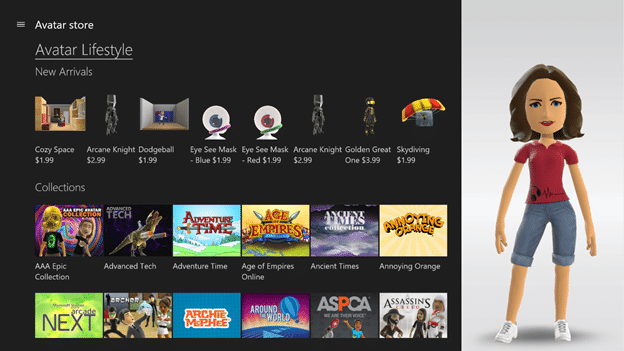
Avatars will now be easier to equip with new outfits and items with a store that just opened its doors. In the console version will appear to the right of the application dedicated to the Avatars, while Windows 10 and mobile can be used to access directly from the application for Avatars. Users can find elements of pay and other free, but everyone can preview in order to see how they feel our virtual character.
The news system also has information about updates, games, releases, tournaments and more. Now all this appear in the filter of activity so that it easier to keep abreast of any important information about Xbox.
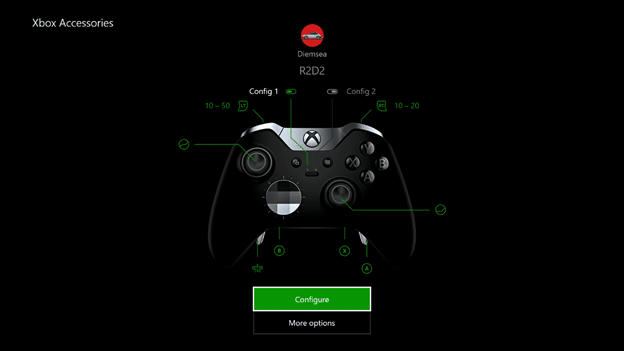
The application to configure the buttons Xbox Elite Wireless Controller. Just after starting the application a number of options for each button individually will appear and you can calibrate sticks to modify the intensity with which you have to press them and feel the vibration in command.
Since Xbox One and from the application of Xbox we indicate which are the best news of the moment on the activities that have made our friends. All this can be images, videos, achievements, etc. and can enable that content would like to see more often and which we prefer not to know about them.
The new features for the application of Xbox
This month the only novelty introduced is the Compact mode. With this update some functions have been moved to this new way to make it much faster switching between friends list, messages, alerts of activity, etc. So we can check everything to make our friends instantly while performing other actions.